 transactable®
How AI uses
creative work.
A photograph. A screenplay. A recording. A video.
Follow their possible journey into training data—and the answers people see.
 01 / THE PHOTOGRAPH
 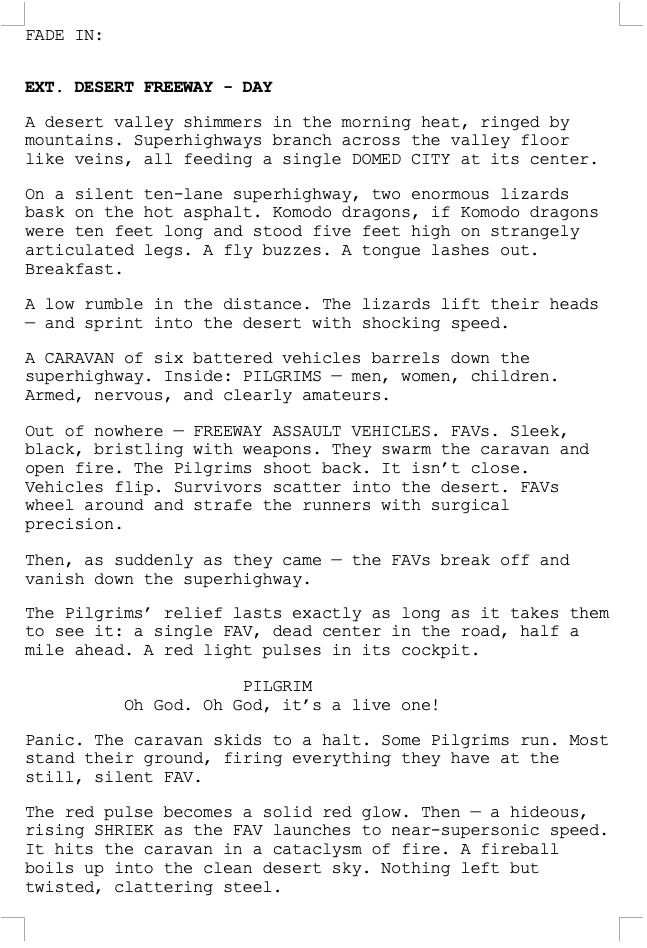 02 / THE SCREENPLAY
  ▶YouTube · 2:11 · 30 fps04 / THE VIDEO
 These works illustrate possible routes. No supplied evidence establishes that any of these works was collected, included in a dataset, or used to train a model.
A published work.
Several possible paths.
A model builder may select a copy of a work for training. An application may also read that work while answering a question. Those routes involve different actions and leave different evidence.
- 01
Publication
A photograph appears online, a screenplay is published, Pull It Over is hosted as a linked MP3, or a video is published on YouTube.
- 02
Possible collection
A collector requests the page and may separately download a linked asset.
- 03
Selection & preparation
A builder chooses records, processes their contents, and assembles training batches.
- 04
Training
Predictions are compared with targets. Optimizer steps update trainable parameters.
- 05
A saved model
A checkpoint records learned parameters for later use.
- 06
A query & an answer
The application generates output, sometimes with fresh material supplied through uploads or retrieval.
A visit can
create a copy.
A collector fetches page content. Images, downloadable documents, audio files, and video streams may require separate requests. A crawler, a dataset, and a model builder each play a different role.
Common Crawl
Crawls websites and publishes web archives that others can use.
LAION / LAION-5B
LAION is an organization; LAION-5B is a particular historical dataset of image-text metadata.
EleutherAI / The Pile
EleutherAI is an organization; The Pile is a fixed collection of text from multiple sources.
A model builder
Chooses data, source proportions, processing steps, and the training recipe for a particular model.
LAION-5B
Builders used Common Crawl metadata to find image URLs and associated text, downloaded images to assess the pairs, and applied filters. The release distributes metadata rather than all original image files.
Downstream users can use those records to locate selected images. A URL may no longer work when they try to download it.
Read the release documentation ↗The Pile
About 825 GiB across 22 text components. Its Pile-CC component contains extracted web text; other components include papers, books, code, and other material.
A fixed historical release does not automatically add today’s webpages. Neither this corpus nor LAION is a universal entry point for AI.
Read The Pile paper ↗A page visit is not an audio download
For Pull It Over, the page and the MP3 file have separate URLs. A collector might save the page’s title and audio link without fetching the recording. Another pipeline might download the audio and pair it with descriptions or other metadata.
The image and text datasets above are examples of other routes, not evidence that this recording entered an audio dataset. A record containing the filename alone does not establish possession of the sound.
A video page is not the video itself
The video example embeds a YouTube player. A collector could record its URL or page text without obtaining any footage. Video streams, audio tracks, and captions are distinct assets; access to one does not establish access to the others.
Which models have documented dataset connections?
GPT-NeoX-20B
Its model card documents training on The Pile.
Stable Diffusion v1
Its documentation identifies selected LAION datasets and subsets. This is an image generator.
Claude disclosures
The presentation cites a proprietary mixture of public Internet material, third-party data, and other sources. Consult the disclosure for the specific model and version.
These examples do not establish use of any supplied work, or use of the same datasets by every frontier model.
The format changes
the route.
A training system needs numerical inputs. How it gets them depends on the source format and the model’s architecture.
The supplied screenplay is a screenshot. A real .docx file usually provides text without optical character recognition (OCR). OCR can introduce errors; extraction can discard layout.
Text becomes tokens
Consider the line “A red light pulses in its cockpit.” A tokenizer divides text into vocabulary entries. Token IDs select learned vectors of numbers, called embeddings.
- AID 0
- redID 1
- lightID 2
- pulsesID 3
- inID 4
- itsID 5
- cockpitID 6
- .ID 7
These word tokens and IDs are invented for teaching. Real tokenizers often split words into smaller pieces and encode spaces. An ID identifies a vocabulary entry; it is not a measure of meaning.
Pixels become patch vectors
At 224 × 224 pixels, splitting an image into 16 × 16 pixel patches produces 196 patches before extra tokens. Each RGB patch contains 768 values before learned projection.
A vision encoder transforms these numerical inputs into visual features. Models can use different resolutions and encoders.
The display groups a 14 × 14 patch layout into a 7 × 7 grid for readability. Each square spans four patches.
From an MP3 to model inputs
If selected, Pull It Over would first be decoded into waveform samples: numbers describing the audio signal over time. A pipeline may resample it, change the channel layout, and split it into clips to match its model’s requirements.
- MP3 fileCompressed recording. Bytes describe the encoding, not the sound directly.
- WaveformDecoded samples: about 5.9 million numbers per channel, drawn here as its real amplitude envelope.
- Prepared clips5 windows of 30 s (the last 14 s). Clip 2 spans 0:30–1:00.
- Model inputsFeatures or discrete audio tokens: 4 codebooks × 50 frames per second = 6,000 tokens per 30 s clip.
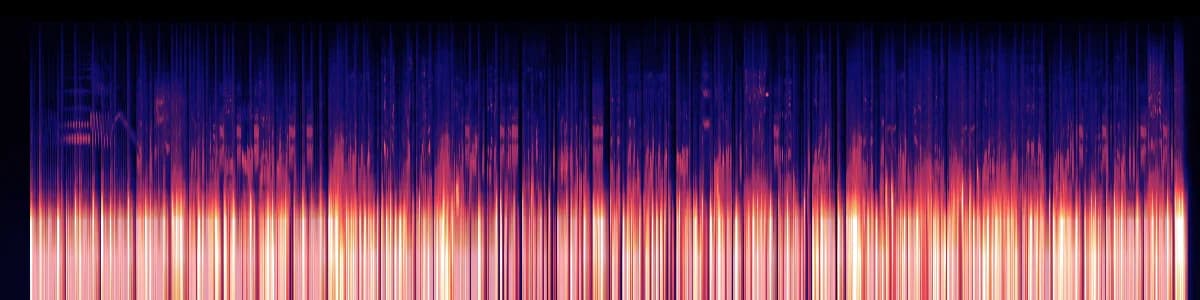
The recording stays audio
Some models process waveforms; others use spectrograms, which represent frequency content over time. A learned audio codec can instead encode sound as discrete tokens for a music generation model. Audio tokens represent sound, not written words.
A transcript is a different input
If intelligible words are present, a transcription system may produce text that a language model can tokenize. That text does not preserve the full performance, instrumentation, or sound. No transcript or lyrics have been extracted for this example.
The waveform and spectrogram above are rendered from the hosted MP3; the clip windows, resampling, and token counts are illustrative arithmetic, not a record of any pipeline processing Pull It Over. See waveform preprocessing, spectrogram inputs, and MusicGen’s codec-token approach.
Video adds a time dimension
A video pipeline may sample frames from selected clips and retain their order and timestamps. A model can use those visual inputs to describe events. Sampling can miss brief actions between frames.
- Source videoEncoded footage on YouTube: 2:11 at 30 frames per second, about 3,930 frames plus a separate audio stream.
- Selected clipsBounded time ranges: 5 windows of 30 s across 2:11. A builder may keep some and drop others.
- Sampled framesKeeping 1 frame per second turns 3,930 frames into 131 still images in time order. Actions between kept frames are lost.
- Model inputsEach kept frame becomes patch vectors (196 at 224 × 224 with 16-pixel patches) and joins the text tokens of a caption or question.
Some video models process only images. Sound requires an audio-capable path; captions or transcripts provide a separate text route. Neither a transcript nor a set of still frames preserves every part of the video.
This is an illustrative workflow. Length and frame rate come from the YouTube listing; the film strip repeats the poster frame. See the video-text-to-text documentation. No frames, audio, or captions have been extracted from the linked video here.
Selection comes before training
Builders check quality and format, filter content, and may deduplicate records. They choose proportions from different sources, create bounded text sequences, image examples, audio clips, or video segments, and load many examples into each batch. The whole corpus need not fit in GPU memory.
Examples shape
numerical parameters.
Training computes a prediction and a loss—a measure of how far that prediction is from its target. Backpropagation calculates gradients; an optimizer uses them to update trainable weights.
Text language model
A common objective is to predict the next token in a sequence, such as the next word or word piece in a screenplay.
Image + text model
A system may learn alignment between images and text, or predict text conditioned on an image.
Audio understanding
An audio classifier can learn to predict labels from sound. Other tasks can pair audio with text targets. The task determines which annotations and model components are needed.
Music generation
In a MusicGen-like system, a transformer learns to predict audio codec tokens conditioned on text. If clips from Pull It Over were selected, their token sequences could supply prediction targets; the loss would guide parameter updates.
Video + text model
A training example can pair a clip’s ordered frames with a caption or question and answer. Predicting the target text can guide updates to trainable components. This differs from training on captions alone.
Image generator
A representative task is denoising images or latent representations, conditioned on text.
Pairing text with an image does not establish the model, learning objective, or trainable components that a lab uses.
How image and text inputs meet inside a language model
Image route
Image pixels → vision encoder → image connector → features in the text context.
Text route
Text tokens → embeddings → transformer blocks alongside the image features.
Attention mixes available context; other layers transform features. An output layer scores possible next tokens. This is a representative LLaVA-like architecture. Some components may stay frozen during a training stage.
For example, an image paired with “A bay with rocks” could train a model to predict “rocks” from the image and “A bay with”. This caption is illustrative, not verified metadata for the supplied photo.
The interactive example below demonstrates text prediction only. It does not process or train on the audio or video examples.
Which word comes next?
“A red light pulses in its _____”
Two fixed input features, [0.60, −0.20], feed three candidate scores. Each score is a weighted sum plus a bias; softmax converts those scores into probabilities.
Before the update · loss 0.9674
One stochastic gradient descent (SGD) step, with learning rate 0.30. Only these six weights and three biases change. A lower loss on this example does not establish better performance overall.
Inspect all nine parameter updates
new parameter = old parameter − 0.30 × gradient
| Parameter | Before | Gradient | After |
|---|---|---|---|
| cockpit weight 1 | 0.2000 | -0.3720 | 0.3116 |
| cockpit weight 2 | -0.1000 | 0.1240 | -0.1372 |
| cockpit bias | 0.0000 | -0.6199 | 0.1860 |
| desert weight 1 | 0.1000 | 0.2191 | 0.0343 |
| desert weight 2 | 0.3000 | -0.0730 | 0.3219 |
| desert bias | 0.1000 | 0.3652 | -0.0095 |
| skyline weight 1 | -0.2000 | 0.1529 | -0.2459 |
| skyline weight 2 | 0.2000 | -0.0510 | 0.2153 |
| skyline bias | -0.1000 | 0.2548 | -0.1764 |
Why the next token stays hidden during text training
In causal attention, each position can use preceding tokens and itself. At “its”, the earlier words are available, while the target “cockpit” remains hidden. Many positions can contribute loss in one parallel training computation.
An attention visibility mask shows which connections are permitted. It does not show measured attention strength. Attention coefficients vary with the input; they are distinct from stored model parameters.
Repeated batches produce a checkpoint
The cycle repeats: batch → prediction and loss → gradients → parameter update. Pre-training builds capabilities across a broad mixture; later training can adapt behavior. A checkpoint saves learned parameters along the way.
Activations change with each input. Trainable weights change when an optimizer applies an update.
A saved model.
New context.
Ordinary inference generates an answer from a prompt and the available context while the model’s weights stay fixed. Accessing a source during that answer is a separate action from training.
| Stage | Training | Ordinary inference |
|---|---|---|
| Input | Examples and targets | Prompt and available context |
| Computation | Prediction, loss, and gradients | Prediction and output generation |
| Parameters | Optimizer updates weights | Weights remain fixed |
| Result | A changed checkpoint | A generated answer |
“Write a scene on a desert freeway.”
Prompt tokens enter the saved model, which produces generated tokens using learned parameters and current context.
This route does not automatically open the screenplay URL or search a training corpus. A similar output does not establish a source fetch.
“Summarize the action on this page.”
An upload, URL fetch, or search supplies an asset or selected passages. The application adds that material to the model’s context to support an answer.
A retrieval system may use an external index; a browser tool may fetch a live page. A URL string alone does not guarantee successful access.
For “Describe the shoreline in this photo”, image features can enter the context. For a screenplay screenshot, a system may use extracted text or page-image features. The asset can inform an answer even if it never appeared in training.
Listening now is different from learning earlier
For “Describe this recording”, an audio-capable application could fetch or receive Pull It Over and pass audio features to a model. A text-only system would need a transcript, caption, or an audio tool. Merely giving a model the title or URL does not mean it heard the file.
A music generator may produce audio tokens that a codec decodes into a waveform. That generated sound is a different route from fetching and playing the original MP3. Similarity alone does not establish that this recording was used in training.
Pressing play on this page uses the browser’s audio player to play the hosted file. This player does not send it to an AI model or run training.
Watching at query time
For “What happens in this video?”, a video-capable application could supply sampled frames as context. Its answer depends on the frames and other inputs it actually receives. Supplying a YouTube URL alone does not establish that the model watched the footage or heard its soundtrack.
The player on the video page streams from YouTube. This guide does not send the video to a model or run training.
Every step leaves
a different kind of trace.
Establishing what happened to one work means matching the claim to the record that can support it.
A collector fetched it
Server logs together with a captured response or crawl record.
A dataset included it
A matching record or asset identifier in that specific release.
A model trained on it
The run’s selected data and training provenance records.
A query accessed it
Tool traces, retrieved passages, or supplied attachments.
A user-agent string can be spoofed. The content at a URL can change over time. Matching content hashes and dates can strengthen evidence about which work was involved.
What would evidence look like for Pull It Over?
File access
Distinguish requests for the page from requests for the MP3. Audio players may request byte ranges; a partial response does not establish a complete download, or identify an AI training purpose.
Prepared clips
Link a source-file hash to derived clip IDs, start and end times, and processing records. Re-encoding or resampling changes file bytes, so an original-file hash alone will not identify every derivative.
Training or query use
Connect those clip IDs to a run’s selected batches, or to a query’s supplied audio and tool traces. Dataset presence, browser playback, and model training are separate claims.
What would evidence look like for the video?
Identify the source URL and video ID, the capture date, and the actual media obtained. Link clip boundaries, frame timestamps, and any audio or caption records to that source. Then connect those derived inputs to a training run’s batches or a query’s tool traces. An embed, page visit, or video ID alone does not establish collection of the footage or model use.
Where a work can leave a trace
Source website
The original page or downloadable file.
Archive or prepared dataset
Copies, extracted text, image bytes, decoded audio, video frames, clips, or metadata.
Model checkpoint
Shared numerical parameters influenced by training. A checkpoint is distinct from source storage, although some training content can be memorized and reproduced.
Retrieval store or query context
Indexed copies, selected passages, image features, audio features, or video frames used for an answer.
Removing an original does not, by itself, erase existing copies or learned parameters. No actual retention history is established for the four works in this guide.
Make the work identifiable.
Then verify each claim.
The creator’s journey can include collection, selection, and changes to shared parameters. Later answers may also receive the work as fresh context. Evidence for each step is what connects that general explanation to a particular work.
Verify a work’s provenance Explore the trust layer ↗Sources & mechanisms
Adapted from How AI uses creative work. The references include sources cited in the presentation and additional audio and video documentation. Dataset examples are historical; consult model-specific documentation for individual releases.
- Video-text-to-text Video frames, temporal context, and text answers
- Audio classification Waveform preprocessing, resampling, and label prediction
- Audio Spectrogram Transformer Frequency-based audio features
- MusicGen documentation Audio codec tokens, music training, and generation
- Common Crawl overview Web collection and archives
- LAION-5B release Historical image-text metadata dataset
- The Pile paper 22-component text corpus
- GPT-NeoX-20B model card Documented language-model training data
- Stable Diffusion v1 model card Documented image-model training data
- Anthropic Transparency Hub Model-specific disclosures
- WordprocessingML document structure Extracting text from Word documents
- Hugging Face tokenizers Tokens, IDs, and vocabularies
- Causal language modeling Next-token training
- Attention Is All You Need Transformer architecture
- An Image Is Worth 16×16 Words Vision Transformer patch inputs
- LLaVA: Visual Instruction Tuning Connecting visual features to a language model
- Optimizing Model Parameters Loss, backpropagation, and optimization
- Retrieval-Augmented Generation Using retrieved material as context
- Extracting Training Data from Large Language Models Memorization and reproduction